


Keep your web applications continuously Secure
Automate the detection of SQL injections, XSS, and authentication bypass vulnerabilities. Catcher24 evaluates your custom web apps from the outside in, providing the exact context your team needs to patch critical flaws before attackers exploit them.
Trusted by companies and organizations from various sectors: Catcher24 offers practical insights that are directly applicable.



What is web application scanning?
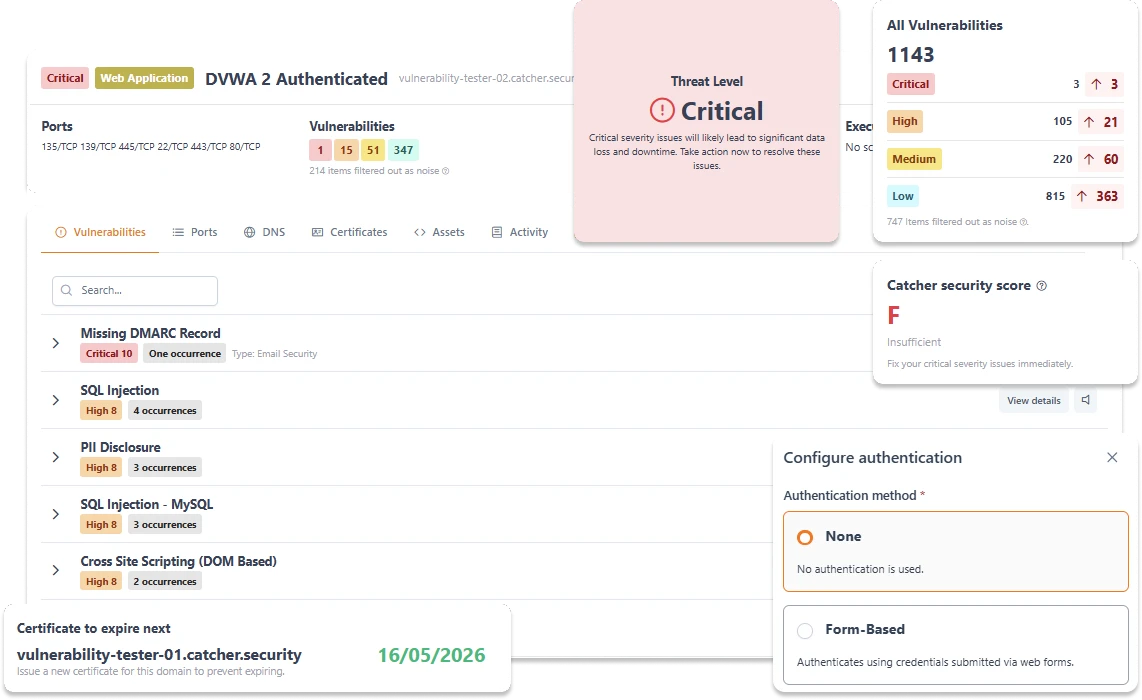
Modern web applications are dynamic and complex, making them highly susceptible to injection flaws and misconfigurations. Web application scanning (often referred to as DAST) evaluates your running application purely from the outside - exactly how a malicious actor would interact with it.
Unlike static code analysis, our automated scanner sends safe, simulated attack payloads (like SQL queries and cross-site scripts) to your web endpoints to see how the application responds. Note: Because these tests actively attempt to interact with your databases, we highly recommend running our deepest scans against staging environments.
You get immediate visibility into how your application handles external threats. We map out the vulnerabilities, assign rigorous CVSS scores, and provide the technical context your engineering team needs to securely resolve the flaws.



What is included in our web application scanner?
Comprehensive threat detection covering the OWASP Top 10 and beyond, designed to secure your custom code and APIs.
SQL Injection
Protection of your data
Secure your databases against unauthorized access. We actively test your input fields and parameters for SQL, NoSQL, and OS command injection vulnerabilities.

Cross-Site Scripting (XSS)
Secure user experience
Protect your users from malicious scripts. We detect reflected and stored Cross-Site Scripting (XSS) vulnerabilities that could compromise browser sessions.
Authentication
Reliable authentication
Validate your session management and access controls. We scan for exposed session tokens, weak password recovery flows, and missing authorization headers.
Outdated libraries
Stay up-to-date and secure
Keep your application configurations locked down. We automatically identify exposed debug directories, verbose error messages, and missing HTTP security headers.
How our web application scanner works
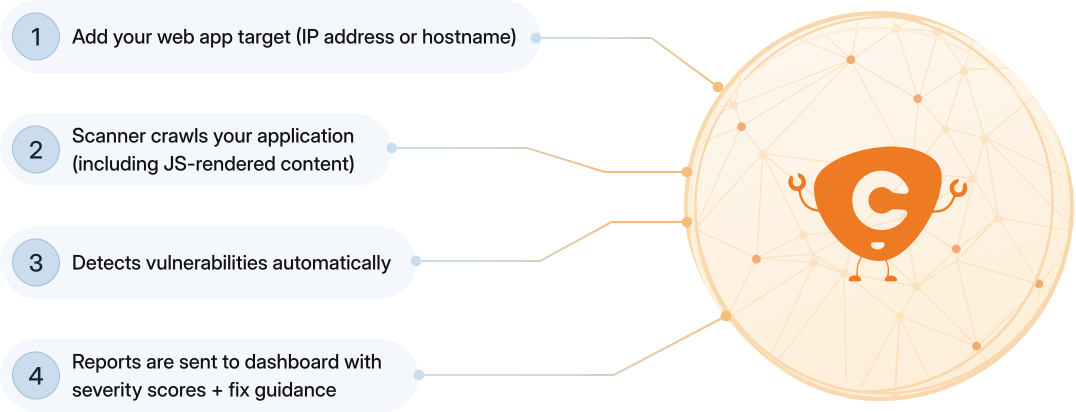
Integrate automated security into your workflow. Add your targets, let our engine map your app, and receive contextual alerts.

100% Outside-in testing

Actionable remediation context

Native developer integrations


The importance of scanning web applications
Your codebase changes continuously. Automated external scanning ensures that new feature deployments don't introduce regressions or critical entry points for attackers.

Catch regressions before exploitation

Prevent costly database breaches

Fulfill compliance security audits
Our intergrations
Embed vulnerability management directly into your active incident response workflows. We push the alerts to where your engineers already work.

Native Slack Alerting
Push prioritized threat alerts directly to specific developer channels. Get notified instantly when a critical CVE is detected on your infrastructure, web apps, or WordPress sites.

Microsoft Teams Webhooks
Automatically notify your IT operations center. Route detailed vulnerability context and severity scores straight into your dedicated Teams workspaces to initiate immediate triage.
Frequently asked questions
"Pentest" is short for "penetration testing." Our automatic web application scanner uses the same methods as cybercriminals to look for weak spots in a website, application, or IT infrastructure. The scan finds and reports vulnerabilities so you can fix them before malicious actors can exploit them.
We recommend scheduling scans regularly, at least once a month, with real-time notifications for any new vulnerabilities that arise.
Infrastructure scan: checks servers, networks, and cloud settings for OS and service vulnerabilities.
Web application scan: tests websites and APIs for application-specific flaws such as SQL injection and XSS.
Consult our help article for a further explanation of the different types of scans.
Yes. The scanner also works with SPAs and APIs, and can scan JavaScript frameworks and other external libraries.
Authenticated scans are scans in which the scanner gains access to parts of the application that require a login or certain permissions. This allows the scanner to also look for vulnerabilities that are behind an authentication layer, for example, in dashboard functions.
Yes, if they are publicly accessible. It is even recommended to use your development/staging as production environments. The scan also tries to perform database injections and can thus damage your database.
No. Modifying custom application code automatically is highly risky and can break functionality. We detect the flaw, provide the exploit context, and supply the technical guidance needed for your developers to safely rewrite or patch the vulnerable code.
Blogs
Read the latest insights, trends, and practical tips to make your company resilient against cyber threats.

Catcher24
•Jul 08, 2026
Secure your WordPress site instantly: Introducing the Catcher24 WordPress plugin


Catcher24
•Apr 13, 2026
Never miss a critical threat: Real-time vulnerability notifications via Slack





Improve your cybersecurity today
Start your free trial now and discover what Catcher 24 can do for your company. No credit card required, no installation. Just real insight into your real risks.
No credit card · 10-day trial · Setup in minutes
