


PHP2Shell: PHP Has Released Patches for Two Critical Vulnerabilities. Here Is What WordPress Owners Must Do
Update, 21 October 2026: PHP has released security updates for two critical vulnerabilities that can allow unauthenticated remote code execution. The flaws leaked before their planned disclosure, and several large websites reportedly went offline as a precaution while waiting for a fix. Every WordPress site runs on PHP, so this affects you. The patches are out. Check your PHP version and make sure it gets updated.
The short version
CVE-2026-109618 and CVE-2026-109619 are two critical PHP flaws, both rated 9.2 on the CVSS v4.0 scale by the PHP security team. They can allow unauthenticated remote code execution.
The fixed versions are PHP 8.5.12, 8.4.27, 8.3.36 and 8.2.35, according to the official PHP announcement.
PHP says there are no complete mitigations and that updating is the only safe choice.
PHP 8.1 and older no longer receive updates from the PHP project.
What happened
20 October: the CVE numbers circulated online. Later that day, the PHP security team published an advance notice of an emergency release, also shared by the PHP Foundation. According to security firm watchTowr, as reported by BleepingComputer, the flaws were originally due to be disclosed on 22 October under embargo.
21 October, 14:00 UTC: PHP released the fixed versions together with a security advisory.
CERT-EU: the EU's computer emergency response team has published security advisory 2026-018 naming both vulnerabilities.
Exploitation: Cloudflare's CTO said the company was seeing early attacks and had deployed firewall rules for the known attack vectors, which he described as a stopgap only.
Public exploit code: code that claims to exploit these flaws has been circulating, and unverified exploit code is sometimes laced with malware. Do not run it.
What are the two vulnerabilities?
PHP2Shell is the name given to an exploit chain for these two flaws. According to the PHP security team, both are triggered while PHP handles an incoming web request:
CVE-2026-109618: when PHP runs out of memory, it can be interrupted while internal request data is only partly set up. The cleanup that follows may then treat that invalid data as valid, which can lead to remote code execution.
CVE-2026-109619: internal request state can survive after the memory behind it has been freed. A later request handled by the same PHP worker may then use that stale state before it is reset, which can also lead to remote code execution.
The advisory states that all PHP installations that serve web requests are at risk, including PHP-FPM, Apache with mod_php, php-cgi, FrankenPHP and LiteSpeed. The risk is considered highest for mod_php, where a demonstrated exploit lets an unauthenticated request trigger the attack before any application code runs. That is why measures that live inside WordPress, such as a security plugin, are not a reliable defense here. The problem sits underneath WordPress.
The severity rating differs between sources. The PHP security team rates both flaws 9.2 on CVSS v4.0, while some early reports cited the maximum score of 10, as noted by Tenable.
Why WordPress owners are affected
According to W3Techs, PHP is used by roughly two thirds of the websites whose server-side language is known. WordPress, Joomla, Drupal, Magento and Laravel all run on it. You can keep every plugin and theme perfectly up to date and still be exposed, because these flaws are not in WordPress. They are in the language WordPress runs on.
Which PHP versions are fixed?
According to the official PHP announcement, these versions fix both vulnerabilities:
PHP branch | Fixed version |
|---|---|
PHP 8.5 | 8.5.12 |
PHP 8.4 | 8.4.27 |
PHP 8.3 | 8.3.36 |
PHP 8.2 | 8.2.35 |
PHP 8.2 reaches end of life on 31 December 2026 and will not receive security fixes after that date, so plan an upgrade to a newer supported branch as well.
What if you run PHP 8.1 or older?
PHP 8.1 and older no longer receive updates from the PHP project. Some Linux distributions and long-term support vendors provide backported fixes, so contact your vendor to find out whether you are covered. The safest long-term choice is to upgrade to a supported PHP version.
Because of the severity, the PHP security team also provided minimal source backports for PHP 7.4, 8.0 and 8.1. These are meant for people who build PHP from source or who have no access to a long-term support vendor. If you manage your own server and rely on the volunteer-maintained rpms.remirepo.net repository, PHP urges you to switch to distribution packages or build from source, because that repository will not have updates today.
How to check your PHP version
In your WordPress dashboard, go to Tools, then Site Health, then the Info tab, and open the Server section. Your PHP version is listed there. You can also find it in your hosting control panel.
One important caveat: Linux distributions and long-term support vendors received the patches in advance, and they may apply them without changing the PHP version number. A server can therefore look vulnerable on paper while already being patched. If you are unsure, ask your host to confirm in writing that the fixes for CVE-2026-109618 and CVE-2026-109619 are installed.
The Catcher24 plugin checks your PHP version
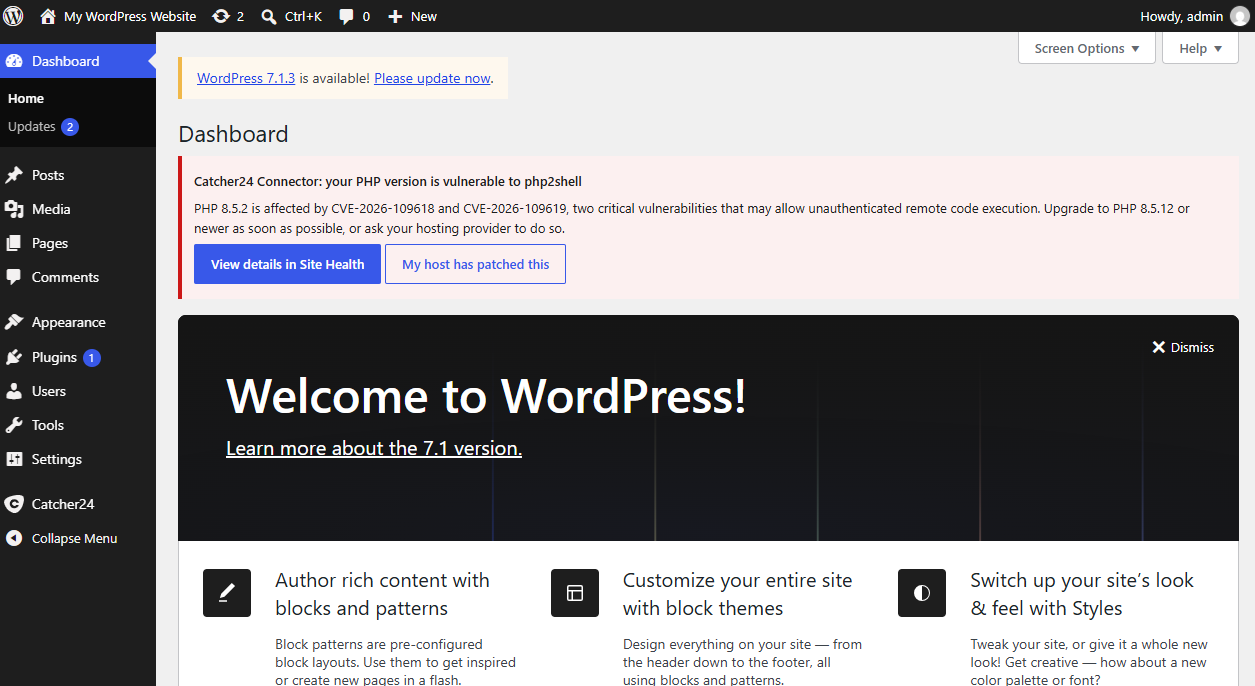
We have updated the Catcher24 WordPress plugin to flag this vulnerability automatically. It compares your PHP version against the affected versions and, if you are exposed, shows a clear warning in your WordPress dashboard. The details also appear under Site Health, including the CVE numbers, the severity, the recommended action, and a link to the CERT-EU advisory.
If your host has backported the fix, you can mark the server as patched with one click, so the warning does not keep nagging you. Your first WordPress site is free to scan.
What to do today
Update the Catcher24 Connector plugin.
Check your PHP version in Site Health or your hosting panel.On managed or shared hosting, ask your host when the fixed PHP version will be active for your site, or whether the fix has already been applied.
If you manage your own server, update to PHP 8.5.12, 8.4.27, 8.3.36 or 8.2.35, or install updated packages from your distribution.
After the update, check Site Health again to confirm the new version is actually running.
If you run PHP 8.1 or older, talk to your vendor about backported fixes and plan an upgrade to a supported version.
If you cannot update right away
PHP is clear that only an update is a complete solution. The measures below, described in the PHP advisory, reduce exposure to specific attack paths but do not make an installation safe. They are meant for server administrators:
Set a low
post_max_size, and keepupload_max_filesizebelow it. The advisory suggests 8M for applications that do not need file uploads, and 32M if uploads are necessary.Set
session.upload_progress.enabled=0in a place that applies before request parsing, such as php.ini, and restart every PHP worker. This blocks the confirmed session paths but not other variants.On PHP 8.5, set
fatal_error_backtraces=0. This blocks only the confirmed fatal backtrace path.The advisory also describes memory limit and container limit settings for the out-of-memory flaw. Read the advisory before changing those, because some well-meant limits can trigger the vulnerable path.
If your site is behind Cloudflare, firewall rules for the known exploit vectors are active on all plans, including the free plan. They only cover traffic that goes through Cloudflare, and Cloudflare itself calls them a stopgap. CERT-EU recommends that organizations that cannot patch immediately consider isolating internet-facing applications from public networks until a fix is in place.
After patching: check that you were not hit
With early attacks reported and exploit code circulating, sites that stayed unpatched for a while may already have been compromised. Once you have updated, look for new administrator accounts you did not create, unfamiliar files or plugins, unexpected redirects, and sudden slowdowns. Our guide to the warning signs of a hacked WordPress site walks through what to check.




Secure WordPress For Free
Catch known CVEs before they are exploited. Install our plugin to run automated vulnerability checks on your themes, plugins, and core directly from your admin panel.
Free for new sign-ups · No credit card · Setup in minutes

Similar posts


